

Virtual Staging
Virtual staging in Fenestra — furnish and style empty interiors using reference photos of real furniture, for real estate listings, marketing and proposals.
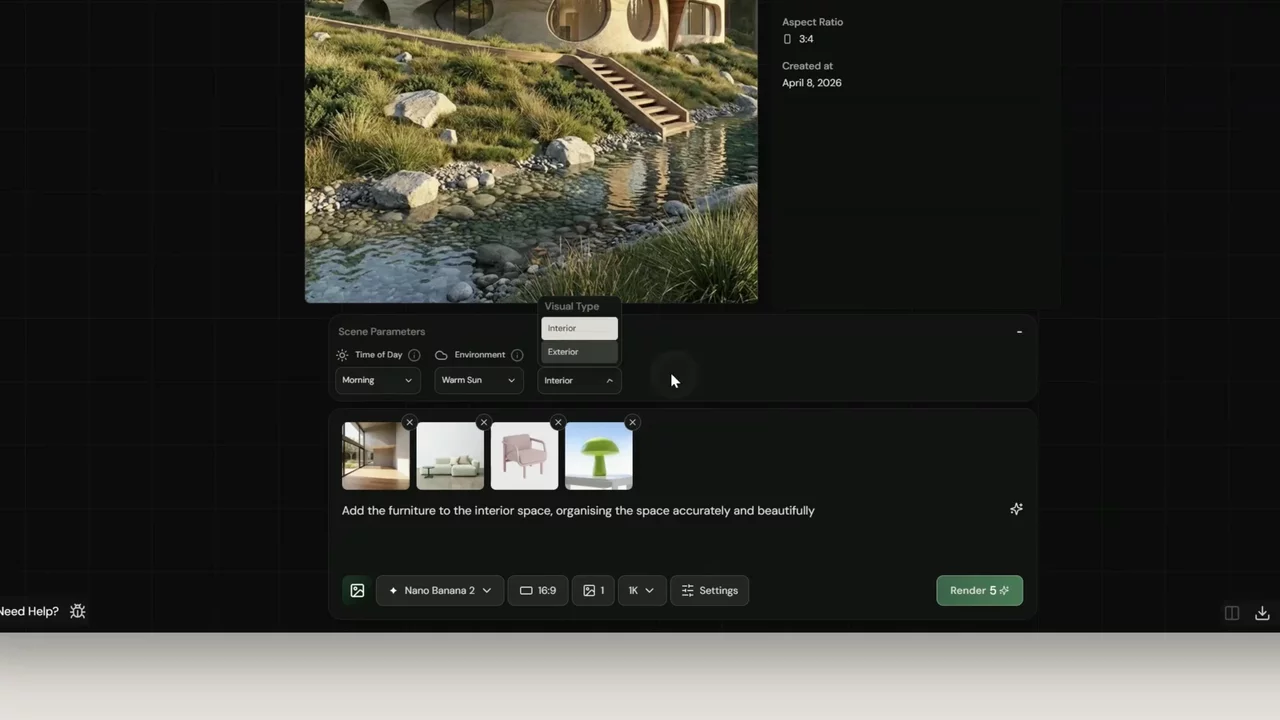
Add your interior
Click Image and click the + button in the prompt bar to add a reference image. Upload a photo of your empty interior space.

Add your furniture
Click + again to add a second reference image. This time upload the furniture you want to place in the space. You can use a moodboard for general direction, or upload specific pieces - for this example we're using a lamp, a green sofa and a pink designer chair.


Write your prompt
Keep it simple and clear. For this example we used:
"Add the furniture to the interior space, organising the space accurately and beautifully."

Set your parameters
For this generation we used:
- Model - Nano Banana 2
- Aspect ratio - 16:9
- Resolution - 1K
- Image count - 2
Generating two images gives you options to choose from.
Render and compare
Click Render. Once your generations appear in the feed, click a result to open it and hit Compare to see the empty space alongside the staged version.

